HOA Management Software That Runs Your Community in Minutes a Week
Perfect HOA® is HOA software for self-managed boards, condo associations, and the managers who support them. Accounting, dues collection, communications, violations, voting, and a resident portal share one platform any volunteer can learn in an afternoon.
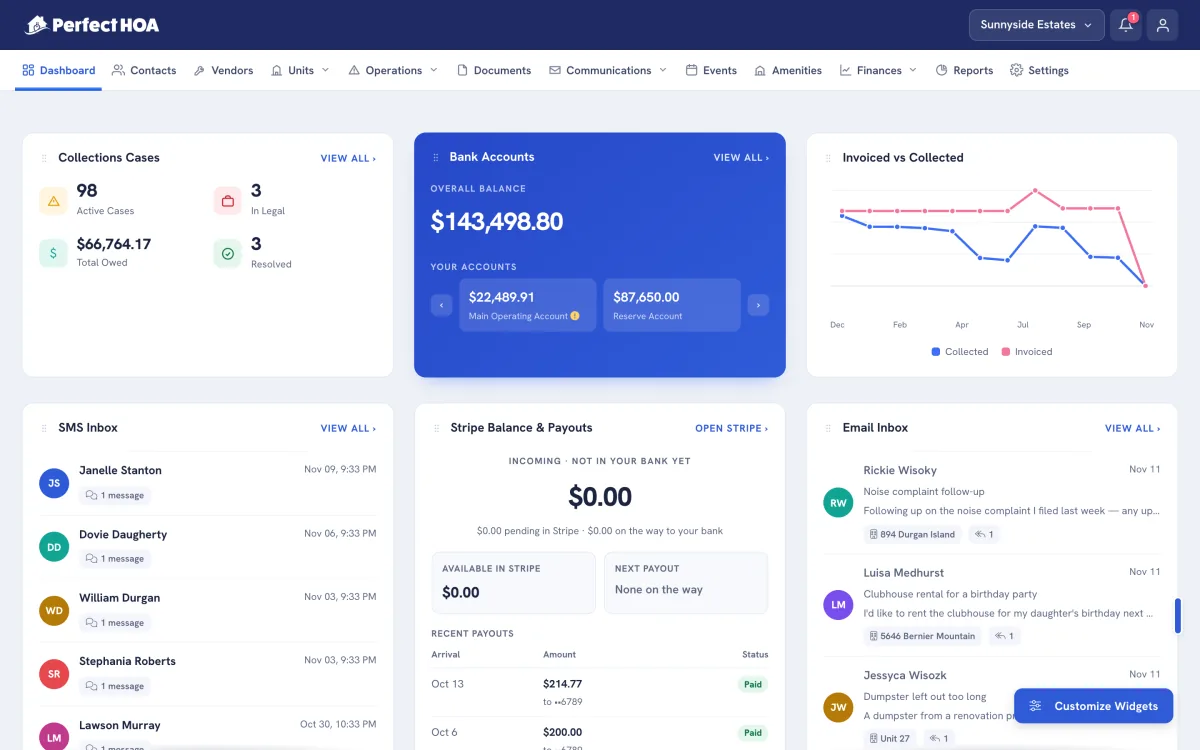
Watch a board run its HOA in one system
A narrated tour of the real app: dues and payments, bank sync, collections, violations, votes, meetings, the resident portal and more, the way your treasurer and secretary use them every week.
Explore the features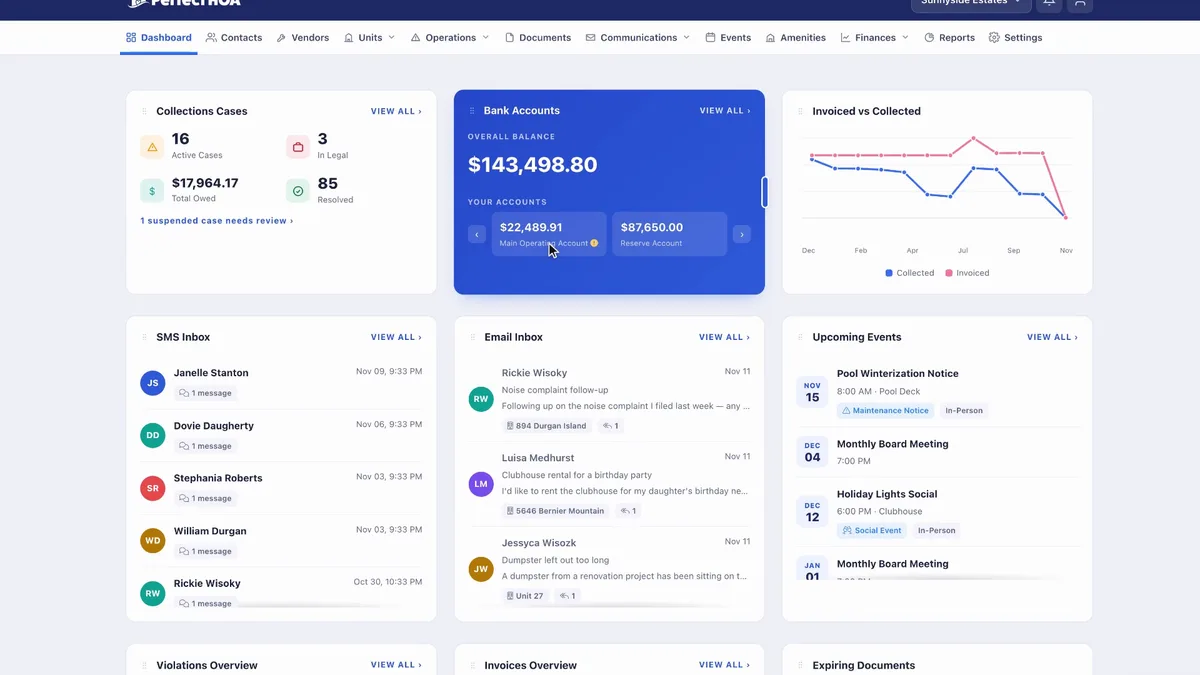
Run your HOA from Claude, ChatGPT or your favorite AI assistant
Connect the AI assistant you already use to Perfect HOA and ask for the work in plain English. Log a violation, find out who is behind on dues, record a check, or set up every unit and owner from your old spreadsheet. It works inside your permissions, and it shows you what it is about to do and waits for your yes before anything changes.
- Works with Claude, ChatGPT, Codex, Cursor and more
- Asks before it sends or changes anything
- Every action recorded in your audit log
- Included in every plan, no AI add-on
Key features of Perfect HOA management software
No more juggling QuickBooks, a mailbox, three group chats, and a shared drive. Each tool shares data with the others, so nothing gets typed in twice.
Books that close themselves
Connect your bank and transactions arrive on their own, sorted by your rules. Operating and reserve funds stay separate, and the balance sheet, profit and loss, and budget vs. actual reports are ready when a board member asks.
- Bank sync through Plaid, with reconciliation
- Operating and reserve funds kept separate
- Financial reports your CPA will accept

Dues collected on schedule
Recurring dues invoices go out on their own and late fees apply automatically. Owners pay online by card or ACH or turn on autopay, payments land in your HOA’s own Stripe account, and each one posts to the right owner ledger.
- Recurring invoices and automatic late fees
- Card, ACH, and autopay
- Past due totals at a glance

Email, text, and mailed letters from one screen
Send a community update by email, an urgent SMS alert, or a printed meeting notice without leaving the app. Homeowner replies land in a shared inbox, and every message stays on file, so the paper trail already exists when a dispute comes up.
- Certified mail with tracking numbers
- Shared inbox for email and SMS
- Every message kept on file

Fair, documented enforcement
Log the issue, add photos, and send follow up notices on schedule. Every case carries its own timeline of notes, notices, and fines, so enforcement stays consistent and every decision can be explained later.
- Photo evidence and a full timeline
- Violation notices by email, text, or mail
- Fines and deadlines on every case

Owner votes with live quorum tracking
Run board, committee, and owner votes online. Owners vote from a secure link sent by email, and turnout updates live against your quorum rule. After a meeting, HOA meeting minutes software drafts the minutes, decisions, and action items for you.
- Board, committee, and owner votes
- Live turnout against your quorum
- AI-drafted minutes and action items

A community website with a resident portal
Publish a community website with pages for rules, amenities, and FAQs, then switch on the members portal behind it. Homeowners get one address for documents, requests, and payments.
- Pages, navigation, theme, and domain
- Resident Login link added automatically
- No developer needed

Every tool, included in every plan
One system for the board, the treasurer, and every homeowner. Pick a feature to see it up close.
An online portal homeowners actually use
Perfect HOA works as an HOA app on any phone, tablet, or computer, with nothing to install. Owners sign in to a secure resident portal with self service options for the things they used to call or email the board about, which means fewer phone calls for volunteers.
- Pay online by card, ACH, or autopay
- Submit maintenance and architectural requests
- Read governing documents and book amenities

Up and running in days, not months
Import units and opening balances from a CSV file, connect bank accounts through Plaid, then invite the board and send owners their portal invitation. Rather hand it off? We handle the data migration for free on annual plans.
- CSV import with column mapping
- Free onboarding with every plan
- Owners invited to the portal

Built for self managed HOAs and property management companies
The same homeowners association management software works whether three neighbors run the association or a professional team manages a portfolio.
Self-managed boards
Volunteer board members get self managed HOA software that handles the repetitive tasks: dues collection, reminders, late fees, and reports. Unlimited board members, at no extra cost.
Condo associations
Track owners and tenants per unit, fund reserves for shared buildings, and route maintenance requests to vendors. See how it works as condo management software.
Management companies
Community managers and professional property managers run multiple communities from one login, with roles that decide what each board and staff member sees.
Every integration built in, with no add-ons or hidden fees





Why boards move to modern HOA software
Most boards come to us from spreadsheets, a management company, or older homeowner association software. Each has a cost that is easy to miss until the treasurer quits or an owner disputes a balance.
From spreadsheets and other tools
Manual work and data entry spread across QuickBooks, Excel, a shared drive, and personal inboxes. Nobody has the whole picture, and the board workload grows every year.
From a management company
Per-door fees, reports on someone else's schedule, and slow answers to owners. Many boards find they can self-manage with the right tools and keep the savings in the reserve funds.
From older HOA software platforms
Dated screens, paid add-ons, long contracts, and poor customer support. We move your balances and history over for free on annual plans.
Perfect HOA vs. spreadsheets vs. a management company
| Perfect HOA | Spreadsheets & generic tools | Management company | |
|---|---|---|---|
| Operating and reserve funds | ✓ Kept separate | Manual workarounds | ✓ Handled for you |
| Online dues collection | ✓ Card, ACH & autopay | Separate payment tool | Usually, through their portal |
| Violations, requests & voting | ✓ Included | Email and paper | Varies |
| Board access to the books | ✓ Real time | Whoever has the file | Reports on their schedule |
| Audit trail and history | ✓ Every action logged | Scattered | Held by the company |
| Cost | From $49/mo, everything included | Low cash cost, high volunteer time | Per-door management fees |
How to choose the best HOA management software
When evaluating HOA software, skip the feature count and check the basic features your board will touch every month. Here is the short list we would use ourselves.
1. Real HOA accounting
Owner ledgers, operating and reserve funds, bank reconciliation, and financial reports a CPA will accept.
2. Online payments owners will use
Card, ACH, and autopay, with clear payment processing fees and money that lands in the association's own account.
3. Operations in one system
Violation tracking, architectural review, maintenance requests, document storage, and voting should not need other tools.
4. A portal residents can manage alone
If homeowners can pay, submit requests, and find governing documents themselves, the board answers fewer calls.
5. Your data stays yours
Look for data export, a full audit trail, and free data migration so switching in or out is never a trap.
6. Pricing that matches community size
Unit-based pricing, every feature included, a real free trial, and no surprise transaction fees for the board.
Simple pricing that scales with your community
$49/month for 1–25 units, billed yearly. Larger communities move up by unit band. Slide to your community size and see your price.
Boards got their weekends back
Self-managed boards and the managers who work with them, in their own words.
“Detailed yet user-friendly bookkeeping that boosts confidence and increases transparency”
Besides the fact that I can sleep easily now, The Perfect HOA software has been a wonderful solution for our HOA. The data—or, more accurately, the lack of usable data—we received from the outgoing management company was a disaster. Perfect HOA created a process not only to integrate the old data into their system, but also to go above and beyond in helping us merge the old accounting data with our current records so that everything finally lined up and the books balanced.
I no longer lose sleep wondering whether I’m missing something. This application is extremely detailed, yet still user-friendly and easy to navigate. The bookkeeping and reporting features make me look like a genius, and I feel much more confident that everything is being tracked properly.

Good to know
Self-managing an HOA
Many self managed communities are run entirely by a volunteer board without a management company. Self management saves money and keeps decisions local, but it only works when the board has a clear system for finances, records, and resident communication.
Community association software
Community management software and community association management software should handle financial management (assessments, ledgers, reserve funds, financial reports) and the operations side (requests, violations, architectural review, voting, communications) without extra add-ons.
Managing multiple communities
Property managers and management companies can manage multiple communities from one login and switch between them in a click. Roles and permissions control what each community manager, board member, and committee member can see and do across the entire portfolio, which is how community management scales.
If you hire a manager
A management company takes on day-to-day work for a per-door fee. If you do hire a manager, choose one that gives the board live access to the books instead of monthly PDFs.
Worth it for small communities
Even a 20-unit HOA has dues to collect, a bank account to reconcile, and owners to keep informed. Homeowners association software replaces the spreadsheets, group chats, and paper checks that eat volunteer time.
Finding your HOA online
Start with your closing documents, a recent dues statement, or the county records for your property. If your HOA uses Perfect HOA, its website has a Resident Login link that opens the owner portal.
HOA management software FAQ
Still have questions? Talk to our team or book a demo.
What is HOA management software?
HOA management software is a centralized platform where a homeowners association or community association runs its business: billing owners, dues collection, paying vendors, keeping the books, enforcing the rules, storing governing documents, and talking to residents. It replaces the mix of spreadsheets, QuickBooks, email threads, and paper files most boards start with, and it cuts the manual work and data entry that drive up the board workload. Because every payment, notice, and decision is saved with a complete history, the next board picks up exactly where the last one left off when a treasurer steps down.
What is the best HOA management software?
The best HOA management software is the one your board will actually use every week. For self-managed HOAs that means real HOA accounting with operating and reserve funds, online dues collection, communication tools, violation tracking, document storage, and a resident portal in one system, at a price that fits a volunteer budget. Perfect HOA includes all of it, from $49 per month.
What is the best HOA software for self managed HOA boards?
Self managed HOA boards need software that volunteer board members can learn without training: plain-language screens, automatic dues and late fees, bank sync, and a portal that answers homeowner questions so the board takes fewer phone calls. The best HOA software for self managed communities also includes every feature in one price, so the board is not paying for add-ons. Perfect HOA was built for that use case.
How much does HOA management software cost?
Most HOA software is priced by the number of units or doors. Perfect HOA costs $49 per month for communities of 1 to 25 units, billed yearly, and larger communities move up by unit band. Every feature is included. Online payment fees are optional and only apply when homeowners pay online: 1.5% + $0.50 for ACH and 3.5% + $0.50 for cards.
Is there an app for HOAs?
Yes. Perfect HOA works as an HOA app for both the board and homeowners. It runs in any web browser on a phone, tablet, or computer, so there is nothing to download. Homeowners sign in to the resident portal to pay dues, submit requests, book amenities, and read community documents.
Is there free HOA accounting software?
Free tools and spreadsheets can work for a very small association, but they rarely support fund accounting, owner ledgers, or online payments. Perfect HOA includes a 30-day free trial, and paid plans start at $49 per month with every feature included.
What's the difference between HOA software and property management software?
Property management software is built for landlords collecting rent from tenants. HOA software is built for associations: owners pay assessments, a board makes decisions, and the community needs governing documents, violation enforcement, architectural review, and owner voting. Perfect HOA is built for associations, with tenant management on each unit for communities that allow rentals.
How long does it take to switch HOA software?
Most boards can start the same day: add units and owners, connect a bank account, and invite the board. If you have years of balances and history, we migrate your data for free on annual plans. A full import typically takes 2 to 4 weeks, depending on the format your data is in.
Give your board its weekends back
Try Perfect HOA free for 30 days with every feature on and no credit card required, or book a live demo and we'll walk your board through your own community.